Cook Book Template
In the digital age, the desire to preserve family recipes and create tangible culinary memories remains strong. However, designing a professional-looking cookbook from scratch requires skills in graphic design, layout engineering, and illustration that many home cooks and food enthusiasts do not possess. This is where pre-designed digital solutions become valuable tools. The Cook Book Template available on Canva offers a comprehensive solution for individuals looking to compile their recipes into a polished, printable format without needing advanced design software.
This article provides an objective evaluation of this specific template collection. It explores the features, benefits, limitations, and ideal use cases to help you determine if this resource aligns with your personal or business goals. By understanding the capabilities and constraints of using a Canva-based template, you can make an informed decision about whether it is the right tool for your next creative project.
Understanding the Product: What Is Included?
The Cook Book Template is not merely a single document but a comprehensive kit designed for customization within the Canva platform. Canva is a versatile online graphic design tool that allows users to create visual content such as social media graphics, posters, presentations, and documents. The template leverages this platform’s ease of use while providing a structured framework for book creation.
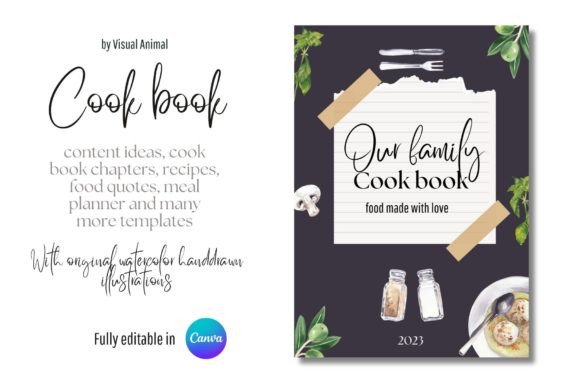
The package consists of 49 pages in total, offering a complete structure for a medium-sized cookbook. Key components include:
- Cover Page: A customizable front cover that sets the tone for the book.
- Table of Contents: A dedicated page for organizing chapters and sections.
- Chapter Dividers: Pages to separate different categories of recipes.
- Recipe Pages: Structured layouts for inputting ingredients and instructions.
- Weekly Menu Planner: Functional pages for meal planning.
- Food Quotes: Decorative pages to add personality and inspiration.
A standout feature of this template is the inclusion of more than 200 hand-painted watercolor food illustrations. These original assets are integrated throughout the design, adding an artistic, organic feel that distinguishes the book from standard text-heavy documents. The ability to edit these elements directly in Canva means you can swap images, change colors, or adjust placement to match your specific aesthetic preferences.
Benefits of Using a Canva-Based Cookbook Template
Choosing a digital template over hiring a professional designer or learning complex software like Adobe InDesign offers several practical advantages.
Cost-Effectiveness
For most individuals, the cost of a digital template is significantly lower than commissioning a custom design. Furthermore, since a free Canva account is sufficient for customizing and downloading the final designs, there are no ongoing subscription fees required specifically for the creation process. This makes it an accessible option for hobbyists, families, and small-scale creators.
Customization and Flexibility
The template is fully editable. Users can add their own images, modify text, and change color schemes. This flexibility allows for a high degree of personalization. Whether you are creating a family heirloom cookbook, a gift for a friend, or marketing material for a small catering business, the design can be adapted to fit those specific needs.
Time Efficiency
Designing a layout from scratch involves making countless decisions regarding typography, spacing, and alignment. A pre-made template handles these structural elements, allowing you to focus on the content—the recipes themselves—rather than the mechanics of page design.
Professional Quality Assets
The inclusion of 200+ hand-painted watercolor illustrations adds a layer of professionalism and artistry that would be difficult and expensive to replicate independently. These assets provide immediate visual appeal, enhancing the user experience for anyone reading the book.
Tradeoffs and Considerations
While the template offers many advantages, it is important to understand its limitations to set realistic expectations.
Platform Dependency
The primary consideration is that this product is tied to the Canva ecosystem. You must have access to Canva to edit the file. While the free tier is robust, certain premium elements or fonts might require a Pro subscription. Additionally, if you wish to print the book professionally, you will need to export the files correctly (usually as PDF Print) and ensure your printer supports the specific dimensions and bleed settings used in the template.
Licensing Restrictions
Users must adhere to the licensing terms provided by the creator. Typically, these templates are licensed for personal use or limited commercial use. The explicit note that you cannot resell or redistribute the digital product is crucial. You are purchasing the right to use the design for your own projects, not the intellectual property rights to the template itself. This prevents the template from becoming a commodity that others can simply buy and sell as their own work.
Learning Curve
Although Canva is user-friendly, it is still a design tool. Users who have never used graphic design software may need a short period to learn how to manipulate text boxes, upload images, and navigate layers. However, tutorials and intuitive interfaces generally mitigate this barrier.
Ideal Use Cases
This Cook Book Template is particularly well-suited for specific scenarios:
- Family Heritage Projects: Compiling recipes from grandparents or parents into a lasting keepsake. The watercolor aesthetic adds a nostalgic, warm touch appropriate for family history.
- Personal Gift Giving: Creating a unique, handmade-feeling gift for weddings, birthdays, or holidays. A custom recipe book demonstrates effort and thoughtfulness.
- Small Business Marketing: Food bloggers, local bakers, or small caterers can use this to create branded recipe cards, weekly menus, or promotional booklets to distribute to clients.
- Meal Planning Enthusiasts: Individuals who enjoy organizing their meals weekly can utilize the included menu planner pages alongside their saved favorite recipes.
When to Consider Alternatives
There are situations where this template may not be the best fit:
- Mass Production Needs: If you plan to print thousands of copies for retail sale, you may need a more robust layout system or a dedicated typesetter to handle large volumes efficiently.
- Strict Brand Consistency Requirements: For large corporations with strict brand guidelines, relying on a third-party template might limit control over specific design elements unless significant customization is performed.
- Complex Layouts: If your recipes involve highly complex multi-column layouts, intricate infographics, or non-standard formatting, a basic template might require extensive modification, potentially negating the time-saving benefit.
Decision-Making Insights
To determine if this Cook Book Template is right for you, consider the following questions:
- What is your budget? If you are looking for a low-cost, one-time purchase that delivers high visual value, this template is a strong candidate.
- How technical are you? Are you comfortable uploading a file to Canva and dragging-and-dropping elements? If yes, this is an easy path to a finished product.
- What is the end goal? Is this for personal use, a small gift, or a large-scale commercial venture? The licensing restrictions apply primarily to redistribution, so personal and small-scale commercial uses are typically safe.
- Do you value aesthetics? The watercolor illustrations are a key selling point. If you prefer minimalist, black-and-white, or modern geometric styles, this specific template’s artistic direction may not align with your vision.
In conclusion, the Cook Book Template represents a practical intersection of convenience and creativity. It democratizes the process of book design, allowing anyone with a story to tell through food to present it beautifully. By leveraging the power of Canva and the charm of original watercolor art, users can produce high-quality physical or digital cookbooks with minimal effort. As long as users respect the licensing terms and understand the platform requirements, this template serves as a valuable asset for preserving culinary traditions and sharing them with the world.