Understanding the Editable Jewelry Display Card Template for Professional Branding
In the competitive landscape of artisanal retail, visual presentation is not merely an aesthetic choice; it is a critical component of brand identity and perceived value. For jewelry makers, small business owners, and craft enthusiasts, the difference between a product that feels like a casual handmade item and one that commands premium pricing often lies in the details of its packaging. One specific tool that has gained significant traction among independent sellers is the Editable Jewelry Display Card Template. This resource allows creators to produce professional-grade backing cards for earrings and other accessories without requiring advanced graphic design skills or expensive software subscriptions.
While traditional methods of creating display cards involve hiring designers or purchasing pre-printed stock, editable templates offer a middle ground that balances customization with convenience. By leveraging digital platforms like Canva, users can tailor every aspect of their merchandise presentation. This guide explores what these templates are, how they function, and whether they represent the right solution for your specific business needs compared to alternative packaging strategies.
What Is an Editable Jewelry Display Card Template?
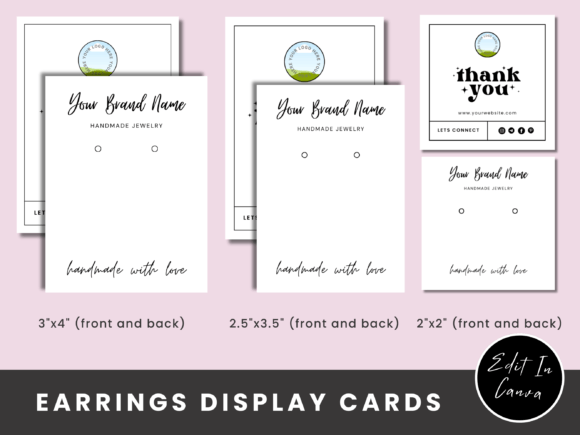
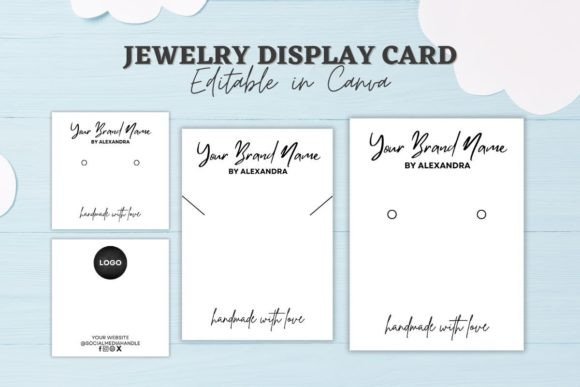
An editable jewelry display card template is a digital file designed to serve as the foundation for physical product packaging. Specifically tailored for items like stud earrings, hoop earrings, and delicate necklaces, these templates provide a structured layout that includes designated spaces for branding, product information, and decorative elements. The "editable" nature of the file means that the user retains full control over the visual components before printing.
Unlike static PDFs or image files that cannot be altered, these templates are typically hosted on cloud-based design platforms. In the context of the most popular offerings, such as those utilizing Canva’s interface, the template unlocks a suite of intuitive editing tools. Users can swap out placeholder images, modify typography, adjust color palettes to match their brand guidelines, and rearrange layout elements. This flexibility ensures that the final printed card aligns perfectly with the aesthetic of the jewelry piece it supports.
The distinct advantage of this format is accessibility. Historically, achieving a polished, boutique-level look required knowledge of Adobe Illustrator or Photoshop. Today, drag-and-drop interfaces have democratized design, allowing artisans to focus more time on crafting their jewelry rather than wrestling with complex software. The result is a cohesive brand experience where the packaging reflects the same care and attention to detail as the product itself.
Key Features and Customization Capabilities
When evaluating an Editable Jewelry Display Card Template, it is important to understand the scope of customization available. Most high-quality templates offer a range of sizes to accommodate different earring styles, ensuring that the hardware (such as hooks or posts) fits securely while providing ample space for branding.
- Size Variations: Standard dimensions often include 2x2 inches, 2.5x3.5 inches, and 3x4 inches. These sizes cater to everything from tiny studs to larger statement pieces, allowing for a uniform look across a diverse inventory.
- Text Manipulation: Users can add new text elements, such as care instructions, material descriptions, or social media handles. Font choices, sizes, and colors are fully adjustable, enabling precise alignment with existing brand assets.
- Background Control: The background layer is typically non-destructive, meaning you can delete the default design or change its color entirely. This is crucial for maintaining brand consistency, especially if your jewelry line features minimalist metal tones versus vibrant gemstones.
- Platform Compatibility: Many templates are optimized for free accounts on platforms like Canva. This removes the barrier of entry regarding monthly software fees, making it a cost-effective solution for startups and hobbyists.
These features collectively streamline the packaging process. Instead of designing each card from scratch, which is time-consuming and prone to inconsistency, sellers can create a master template once and duplicate it for multiple products. This efficiency is particularly valuable during peak seasons like holidays, when order volumes spike.
Comparing Templates to Alternative Packaging Solutions
To make an informed decision, it is helpful to compare editable templates against other common approaches used by jewelry businesses. Each method has distinct tradeoffs regarding cost, quality, and scalability.
Pre-Printed vs. Digital Templates
Purchasing pre-printed display cards from wholesale suppliers offers immediate convenience. You simply print them out and attach them. However, this approach lacks personalization. The designs are generic, and you cannot easily update them if your logo changes or if you want to introduce a new seasonal theme. Furthermore, pre-printed options often come in minimum order quantities, leading to waste if certain designs do not sell as expected.
In contrast, an Editable Jewelry Display Card Template eliminates inventory risk. Since you print only what you need, there is no excess stock. The ability to update designs instantly means your packaging always feels current. The primary tradeoff is the initial time investment required to set up the template, though this is a one-time effort that pays off through long-term flexibility.
Professional Design Services vs. DIY Templates
Hiring a professional graphic designer yields unique, bespoke artwork. This is ideal for established brands with high budgets seeking a completely distinct visual identity. However, for many artisans, the cost of custom design services is prohibitive. Additionally, making minor updates—such as changing a price or adding a new tagline—often requires contacting the designer again, incurring additional fees and delays.
Templates bridge this gap. They provide a professionally curated starting point that looks polished and intentional. While the design may not be entirely unique to your brand in the way a custom illustration would be, the level of customization allowed within the template ensures that the final output feels tailored. For small to medium-sized businesses, the balance of cost-efficiency and professional appearance makes templates a superior choice.
Plain Cardstock vs. Branded Cards
Some sellers opt for plain white or kraft cardstock, relying solely on handwritten notes or stickers for branding. While this can convey a rustic, ultra-handmade vibe, it often fails to communicate professionalism at scale. It can also appear disorganized in a retail setting. A branded template provides structure and authority, signaling to customers that the business is established and trustworthy. The slight increase in effort required to use a template is often justified by the enhanced perceived value of the product.
Best-Fit Situations and Limitations
Understanding when to use an Editable Jewelry Display Card Template is key to maximizing its benefits. These resources are particularly well-suited for:
- Craft Fair Vendors: Sellers who attend multiple events benefit from the ability to quickly create themed cards for different seasons or holidays.
- Online Boutique Owners: For e-commerce businesses, unboxing experiences are vital. Branded cards enhance the customer’s first impression, encouraging social media shares and repeat purchases.
- Artisans Scaling Up: As production volume increases, the efficiency gains of using a reusable template become more significant, saving hours of manual design work.
However, there are limitations to consider. First, the quality of the final product depends heavily on the printer. While the digital file can be perfect, low-quality home printers may struggle with color accuracy or paper weight. Using a professional print shop or investing in a high-end inkjet printer is recommended for best results.
Additionally, while templates are user-friendly, they still require a basic understanding of design principles to avoid cluttered layouts. Users must be mindful of font legibility and color contrast. Finally, reliance on a specific platform (like Canva) means that access to the template is contingent on having an active account. If the platform changes its terms or discontinues support, users should ensure they have exported their designs in standard formats for archival purposes.
Decision Factors for Your Business
Choosing between an editable template and other packaging solutions ultimately comes down to three factors: budget, brand consistency, and operational capacity.
If your budget is tight and you lack design expertise, a template is likely the most viable option. It provides a high-end look without the associated costs. If brand consistency is a priority, the ability to lock in specific fonts and colors across all products makes templates indispensable. Lastly, if your operational capacity is limited by time, the efficiency of duplicating and tweaking a single template far outweighs the effort of designing from scratch or managing physical inventory of pre-printed cards.
For those just starting out, experimenting with an Editable Jewelry Display Card Template offers a low-risk way to test the impact of professional packaging on sales. As your brand evolves, the template can evolve with it, ensuring that your presentation remains as dynamic and engaging as the jewelry you create. By taking control of your visual identity through customizable tools, you empower yourself to present your work with the confidence and polish it deserves.